Streamline your localisation workflow by connecting GitHub directly to XTM’s translation management platform. Sync your code repositories, translate content seamlessly, and push localised files back to GitHub – all without leaving your development environment.










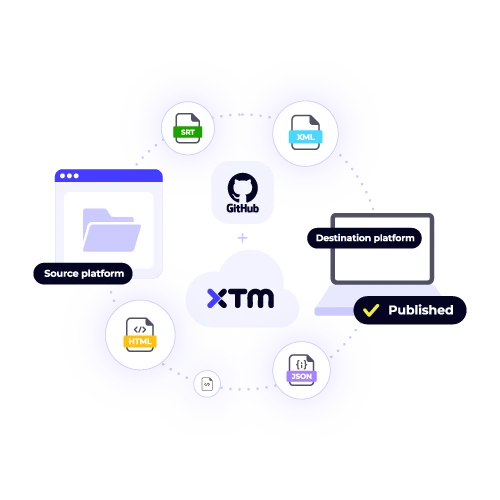
Transform how you handle translations in your development process. Our GitHub integration eliminates manual file transfers and keeps your localised content in perfect sync with your codebase.
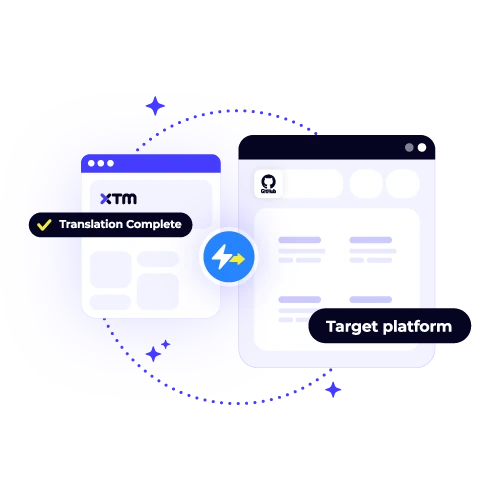
Connect your repositories and watch as translatable files sync automatically to XTM. No more manual uploads or version control headaches.
See translation progress in real-time as your team works. Get instant notifications when translations are ready to merge back into your GitHub repository.
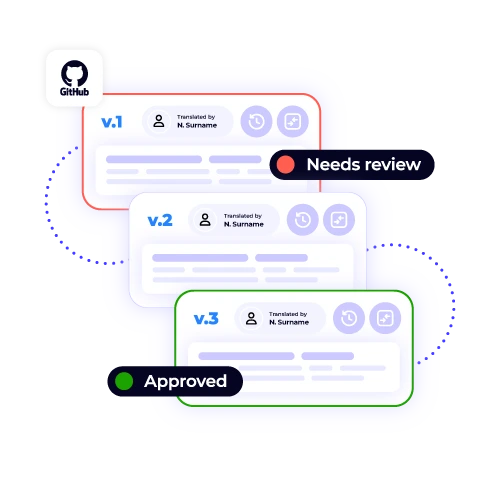
Every translation update creates proper commits with detailed messages. Your Git history stays clean and your team knows exactly what changed.

Built for developers who want translations to fit naturally into their existing GitHub workflow. No context switching or complicated processes.
Set up your GitHub integration in three simple steps and start translating your projects more efficiently.

Deepak Nagabhushana
Staff Localization Project Manager, GoTo

Dominic Pemberton
VP of Content, RS Group

Alex Katsambas
Senior Head of Localization Services, FARFETCH

Vincent Rigal
CAT Tools Products Owner, Acolad

XTM is a complete translation management platform that helps businesses localise content faster and more accurately.
Beyond GitHub integration, XTM offers powerful translation tools, quality assurance features, and project management capabilities that make localisation simple for teams of any size.
Reuse previous translations automatically
Built-in checks catch errors before delivery
Track progress across all your translation projects
Connect to your existing tools and workflows
Keep translators and reviewers aligned
Monitor performance and translation metrics

Our GitHub app supports a wide range of file types to facilitate seamless integration and ensure that your localization and translation needs are met. Specifically, it is compatible with JSON, YAML, XML, and properties files, which are commonly used in software development for configuration and data interchange. Additionally, our app supports most standard localization formats, ensuring that language-specific adaptations can be efficiently managed. Moreover, we can handle Markdown files, which are often used for documentation, as well as various other text-based content that requires translation, making our integration versatile and comprehensive.
The integration utilizes XTM to manage translation tasks by creating dedicated branches specifically for translation work. This approach ensures that translation activities are organized and separate from your main development branch. Once the translations are complete, XTM automatically generates pull requests, allowing you to review and assess the proposed changes thoroughly. You maintain full authority over the merging process, ensuring that you have the opportunity to review, approve, or request modifications to the translations before they are incorporated into your live environment.
Certainly! You have full control over the content that is sent for translation, allowing you to tailor the process according to your needs. By configuring filters, you can choose specific file types, designate certain folder structures, or select particular repositories to manage what gets translated. This means you can ensure that only the content that is relevant and necessary reaches your translators, optimizing both time and resources. This flexibility allows you to focus on translating the most impactful and pertinent materials, enhancing efficiency.
XTM is designed to automatically detect any changes made to your source files during the translation process. When updates occur, the system immediately reflects these changes in the ongoing translation projects. This ensures that the translators are always working with the most current version of the document, allowing them to seamlessly integrate new information into their work. As a result, translators can efficiently modify their translations to accommodate the latest updates without needing to restart the entire process, maintaining continuity and saving time.
Absolutely. Our GitHub integration is designed to seamlessly work with both public and private repositories, ensuring flexibility and security for all users. When it comes to private repositories, we prioritize your privacy and data security by employing secure authentication methods. This means that our integration will only access your repositories after you’ve granted explicit permission, ensuring that your sensitive information remains protected. Our commitment to security means you can confidently manage your projects without worrying about unauthorized access or data breaches.
XTM offers a comprehensive solution for tracking the translation progress of your GitHub projects in real-time. Through the XTM dashboard, you can monitor various aspects of your translation tasks. This includes checking the completion status of each project, which allows you to see how far along the translation process is at any given time. Additionally, you can review quality scores that provide insights into the accuracy and quality of the translations. The dashboard also displays estimated delivery times, helping you manage deadlines efficiently and ensuring timely project completion.
Yes, the GitHub integration is designed to support seamless team collaboration, enabling multiple developers to access and work on the same connected repositories. This setup allows for efficient code management and project development. Meanwhile, on the translation side, XTM facilitates collaboration among translators, ensuring that translation tasks are managed effectively. By enabling both developers and translators to collaborate within their respective environments, the integration helps streamline workflows and enhances productivity across different aspects of a project.
While the GitHub integration primarily focuses on translating file-based content, XTM’s main platform is designed to accommodate a broader range of translation needs. This means that if you have content that is not stored in files, such as web content, documents, or other materials, you can still effectively manage and translate them using XTM. The platform provides a centralized solution that allows you to handle multiple types of content simultaneously, ensuring a streamlined and efficient translation process across all your projects. This flexibility means you can keep your translations organized and consistent, regardless of their format.
Dig deeper into how XTM delivers faster localization, greater control, and real ROI—so you can make the right call for your team.