Streamline your Notion workspace translations with XTM’s powerful localization platform. Connect your Notion content directly to professional translation workflows and deliver multilingual content faster than ever. No more copy-paste headaches or version control nightmares.









Say goodbye to manual translation workflows. XTM’s Notion integration brings professional localization directly into your workspace, making global content creation effortless.
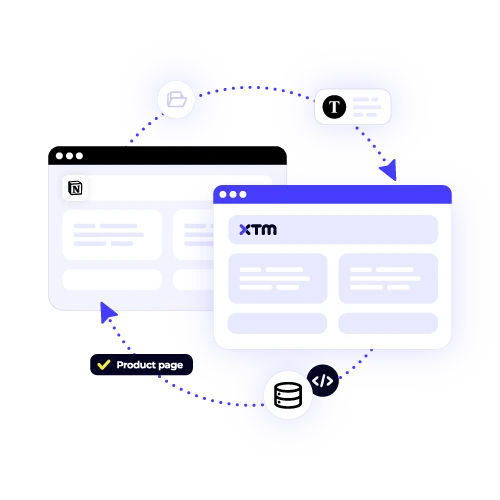
Push your Notion pages straight to XTM without leaving your workspace. Our Notion app detects changes and keeps everything in sync, so you never miss an update or lose track of what needs translating.

Access XTM’s network of certified linguists and advanced translation tools. Your Notion content gets the same quality treatment as enterprise documentation, with terminology management and quality assurance built right in.
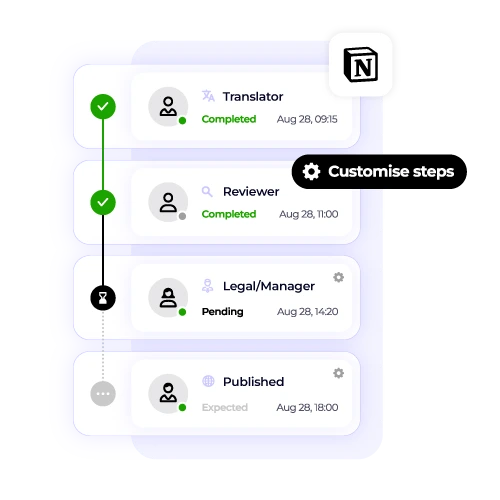
Translated content flows back into your Notion workspace automatically. Create new pages for each language or update existing ones. Your team can collaborate on multilingual content without switching platforms.
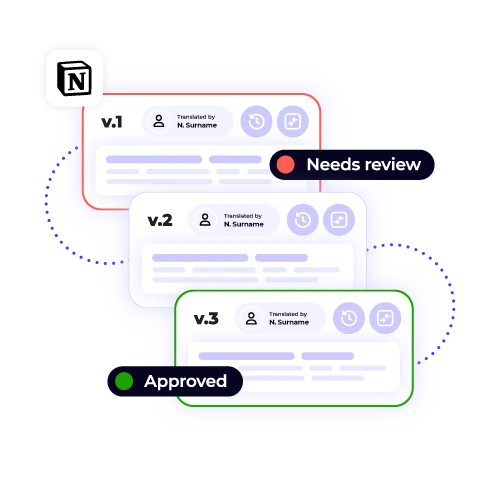
Track every change, revision, and approval in one place. See exactly what’s been translated, what’s in progress, and what needs attention. No more confusion about which version is current.
Connect your Notion workspace to XTM in three simple steps. Start translating your content professionally without changing how your team works.

Deepak Nagabhushana
Staff Localization Project Manager, GoTo

Dominic Pemberton
VP of Content, RS Group

Alex Katsambas
Senior Head of Localization Services, FARFETCH

Vincent Rigal
CAT Tools Products Owner, Acolad

XTM is the translation management system that makes global content creation simple and scalable.
Beyond Notion integration, XTM connects with over 50 platforms to centralise your entire localization workflow. From websites and apps to documentation and marketing materials, everything gets translated consistently using the same quality standards and terminology.
Coordinate projects across multiple languages and deadlines. Assign work to internal teams or external vendors with complete visibility into progress and quality.
Built-in review workflows and linguistic quality checks ensure every translation meets your standards before publication.
Maintain consistent brand voice across all languages with centralised glossaries and translation memories.
Reduce manual tasks with intelligent routing, automatic notifications, and seamless handoffs between team members.
Track translation costs, turnaround times, and quality metrics across all your content and languages.
Access XTM’s network of certified linguists or manage your own translation teams with detailed performance tracking.

The XTM-Notion integration works by leveraging Notion’s API to seamlessly synchronize your content with XTM’s advanced translation platform. To get started, you need to install the Notion app, which facilitates the connection between the two services. Once installed, you can choose the specific pages or databases within Notion that you wish to have translated. The integration ensures that your content flows automatically between Notion and XTM, maintaining the original formatting and structure. This streamlined process enhances efficiency and ensures that your translated content remains accurate and well-organized.
Yes, XTM’s Notion plugin supports the translation of both pages and database entries, offering a comprehensive solution for multilingual content management. You can translate various elements within a Notion database, including database properties and rich text fields. This means that labels, descriptions, and any other text-based information in your databases can be seamlessly translated. Additionally, the plugin ensures that relationships between entries are preserved even after translation, allowing you to maintain the integrity and functionality of your databases across different languages. This feature is particularly beneficial for users managing global projects.
The integration with Notion supports a comprehensive range of content formats, ensuring seamless handling of all types of data within your workspace. This includes basic text, various heading levels, and lists—both bulleted and numbered. It also accommodates complex structures like tables and supports embedded media such as images, videos, and other multimedia content. During the translation process, all formatting elements, hyperlinks, and the overall page structure are meticulously preserved, ensuring that your information is delivered back intact and organized appropriately.
Pricing for the Notion translation integration varies according to your specific translation volume and requirements. XTM International provides flexible pricing plans that cater to different needs, starting with pay-per-word options for those who have smaller, less frequent translation projects. For users with larger demands, such as businesses or organizations requiring high-volume translations, enterprise subscriptions are available. These plans are designed to offer cost-effectiveness and scalability. To receive an accurate and tailored quote that reflects your unique Notion usage and translation needs, please contact us directly.
Certainly! You can definitely use your own translators with the Notion integration. XTM is designed to support both our network of certified linguists and your personal translation teams. You have the flexibility to invite your translators to collaborate on Notion projects directly within the XTM platform. Additionally, you can assign translation work to external vendors while still maintaining full visibility and control over the entire process. This ensures that your specific needs are met with the expertise of your chosen translators, without compromising on oversight.
Setting up the Notion integration with XTM is generally a quick and straightforward process, typically taking less than 10 minutes. To begin, you need to install the XTM app from Notion’s integration directory. Once the app is installed, the next step is to authenticate your XTM account to ensure secure access. After authentication, you will be able to select which content you want to sync between the two platforms. If you encounter any issues or have questions during the process, our support team is readily available to provide guidance and assistance with the configuration to ensure everything runs smoothly.
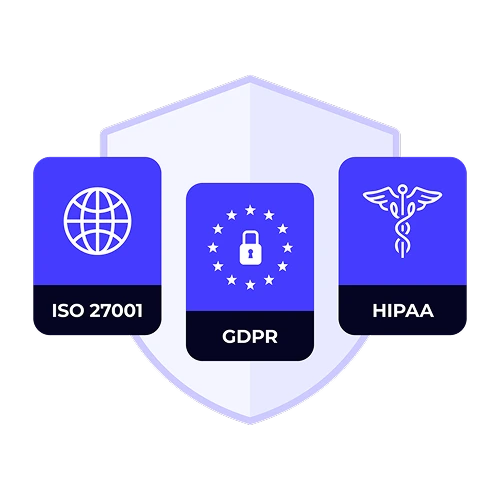
Yes, your Notion content is secure during translation with XTM. The platform upholds enterprise-grade security standards, which include ISO 27001 certification, ensuring a systematic approach to managing sensitive data. XTM is SOC 2 compliant, demonstrating its adherence to rigorous security, availability, and confidentiality standards. The company also complies with GDPR, providing robust data protection for users in the EU. Your content is encrypted both in transit and at rest, which means it is protected while being transferred and when stored. Access controls are in place, ensuring that only authorized team members and translators have the necessary permissions to view your content, adding another layer of security to safeguard your data.
The XTM Notion app integrates seamlessly with your Notion workspace, allowing you to track translation progress effortlessly. You can receive status updates directly within Notion, which lets you stay informed about which pages are currently undergoing translation. This feature helps you monitor the progress in real time and ensures you can review the ongoing work without leaving the platform. Additionally, it facilitates smooth communication with translators, enhancing collaboration. For more comprehensive project details, you can access your XTM dashboard whenever necessary.
Dig deeper into how XTM delivers faster localization, greater control, and real ROI—so you can make the right call for your team.